Home » The Digital SAT: What’s Tested, How It’s Scored, and How to Improve Your Score » The 17 Digital SAT Math Topics: How Often Each Is Tested and What to Study First » SAT Combining Like Terms and Solving Equations: Lesson, Practice Problems & Video Explanations
By Glyn Caddell, BSME · Author of Digital SAT Math Secrets · Tutoring since 2008 — Updated August 18, 2026
Combining like terms & solving equations appears approximately 11.7% of the time on the Digital SAT. These questions fall under two different categories according to the College Board. Combining like terms falls under Advanced Math, and solving equations falls under Algebra. Combining like terms & solving equations questions test students’ ability to combine like terms and solve simple or complex equations, but in many cases you can use the Desmos calculator to solve them.
Combining Like Terms & Solving Equations Lesson
The lesson covers the types of Combining Like Terms & Solving Equations questions that show up on the Digital SAT, how to approach the questions, and an example of an SAT question.
What Do Combining Like Terms & Solving Equations Questions Look Like?
Combining Like Terms & Solving Equations questions typically have an expression that can be simplified or an equation that can be solved for a single variable. Here are some examples of Combining Like Terms & Solving Equations questions from the Digital SAT.
- What is the solution to the given equation?
- What value of
is the solution to the given equation?
- Which expression is equivalent to…
1. Combining Like Terms
What are Like Terms?
Like terms have:
- The same variable
- Raised to the same exponents
Only the coefficients (the numbers in front of the terms) may be different.
Examples of like terms
and
and
and
and
and
Examples of unlike terms
and
and
and
and
and
How to Combine Like Terms
- Identify like terms
- Group terms with the same variable(s) and exponents
- Combine them by adding coefficients
- Leave the variable part unchanged
- Watch for signs in front of each term
- A minus sign is really a negative sign
Example
Simplify the following expression.
Group Like Terms and Combine
-terms:
, to get
-terms:
, to get
-terms:
, to get
Final Answer
Adding and Subtracting Expressions
When questions ask us to add and subtract expressions, we are really being asked to combine like terms.
Example
What is the sum of and
?
Explanation & Solution
To solve this let’s add them together.
Distribute the plus sign to each of the terms in the second expression. When you do that, all of the terms remain the same and we can drop the parentheses.
Now, just combine like terms to get
Example
Simplify

Explanation & Solution
Distribute the minus sign to each of the terms in the second expression. When you do that, all of the terms get negated and we can drop the parentheses.
Now, just combine like terms to get
2. Solving Equations
To solve equations on the Digital SAT students can solve them using Desmos or solve them algebraically.
How to Solve Equations with Desmos
Most equations can be solved using the Desmos calculator.
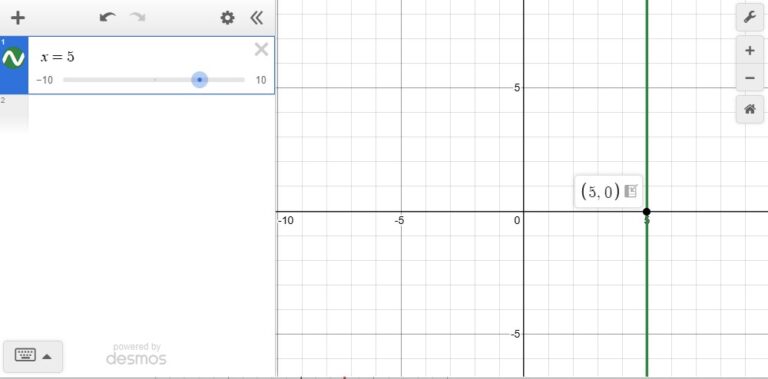
The graph of will be a vertical line passing through the
-axis at 5.
The reason is that every point on that line has an -value of 5. The
-value changes, but
remains 5.
This is a graph of in Desmos.
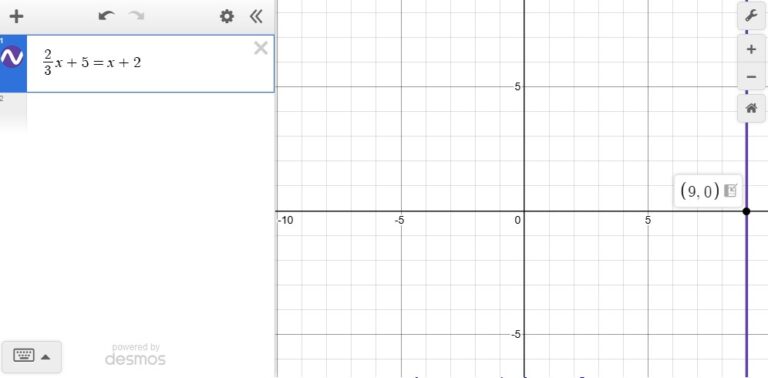
We can use this to solve equations with one variable. Simply, type in the equation into Desmos.
For example, the solution to is 9.
That means the equation is equivalent to
. Therefore, if we graph the equation
, we will just get the graph of
.
We can solve just by graphing it and checking the
-intercept.
Solving Equations with Square Roots or Absolute Values
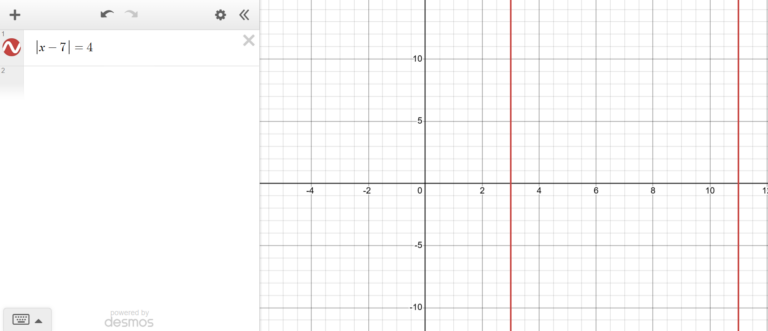
The same method of using Desmos can be used to solve equations with square roots or absolute values. Make sure to zoom out when using Desmos because you may get two solutions, but only one might be visible in the default view on Desmos. Also, note that you cannot click on the -intercepts when the solutions to square root or absolute value equations are graphed. Zoom in to make sure the solution is the value you expect.
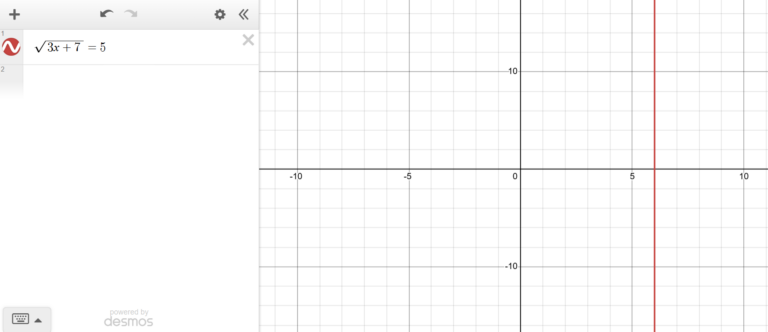
Example of Solving an Equation with a Square Root Using Desmos
Example of Solving an Absolute Value Equation Using Desmos
How to Solve Equations Algebraically
To solve equations algebraically, you need to use inverse operations and apply order of operations (PEMDAS) in reverse to isolate the variable you are solving for.
For example, let’s examine the equation
represents a number, so if we treat
like a number and think about how we would follow order of operations on the left side of the equation, we would
- Multiply 3 and
- Add the 2
To solve the equation we have to do order of operations in reverse and use inverse operations.
Adding the 2 is done last in order of operations, so we would take care of that first. We have to do inverse operations, so we would subtract 2.
Multiplying by 3 is done first in order of operations, so we would take care of that last. We have to do inverse operations, so we would divide by 3.
- Subtract 2 from both sides
- Divide both sides by 3
Here are the steps solving the equation:
subtract 2 from both sides
divide both sides by 3
Some tricks to make solving equations easier include choosing to distribute or divide a coefficient, multiplying all terms by the LCD to eliminate fractions, and cross multiplying when a fraction is set equal to a fraction.
Distribute a Coefficient Into Parentheses or Divide by the Coefficient
If there is a number outside a set of parentheses, you can choose to distribute it or divide it.
The equation can be solved two different ways.
We can either distribute the to each of the terms or divide by the
.
Example of Distributing
distribute the into the parentheses and the equation becomes
add to both sides of the equation
divide both sides by to get
Example of Dividing First
divide both sides by to get
add to both sides of the equation to get
With both methods we are able to get . However, on the SAT there may be questions in which one method works better than another.
Example
. What is the value of
?
Explanation & Solution
In this question, the expression we are solving for can be found directly.
If we divide both sides by , we will have the answer immediately. It would be a waste of time to distribute the
.
divide both sides by to get
The answer is .
Multiply All Terms by the Least Common Denominator (LCD) to Eliminate Fractions in Equations
The following equation
can be intimidating for students.
Many students are not comfortable working with fractions. Plus, there is room to make mistakes with fractions.
We can multiply all of the terms in the equation by the LCD to cancel out the denominators, so we are left with integers.
Example
What is the value of in the following equation?
Explanation & Solution
The denominators in the equation above are 3, 5, and 6.
To find the least common denominator, we need the least common multiple of the denominators.
In this case, the LCD is .
We should multiply each term in the equation by 30 to get

Reduce each term to get
Simplifying further gives us
Now, we can solve like normal.
Add to both sides to get
Divide both sides by to get
Cross Multiply When a Fraction Equals a Fraction
If you have an equation in which one fraction equals another fraction, it is a proportion. To solve a proportion you should cross-multiply.
It is best to simplify each fraction as much as possible before cross-multiplying.
Example
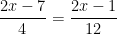
Solve for in the equation below.
Explanation & Solution
Cross-multiply to get
Simplify both sides
Since there is an -term on both sides of the equation, we should get them both on one side.
Subtract from both sides. (You can subtract
from both sides instead. It is up to you)
Add to both sides to get
Divide both sides by
Reduce
Tips
- Distribute leading coefficients including their signs to each term within parentheses.
- Identify like terms before combining them. Combine like terms by adding them together, treating a leading minus sign as a negative sign.
- Practice solving equations using Desmos, so you can answer the questions quickly on the Digital SAT.
- Also, practice solving equations by hand because the skill is necessary for solving for a variable in terms of another.
- Double check the prompt to identify exactly what the question is asking for: is it asking to solve for just
or for something else such as
?
Example
If , what is the value of
?
A) 18
B) 24
C) 26
D) 27
Video Explanation
Text Explanation
Answer: C
First distribute:
So the equation becomes:
Combine like terms:
Add 19 to both sides:
Divide by 2:
Now find :
Therefore, the correct answer is C.
Practice Problems with Video Explanations
Here is a set of practice Digital SAT Combining Like Terms & Solving Equations practice problems. After selecting an answer, press “See Answer” to see the correct answer and a video explanation showing how to properly solve the questions. At the end of the set, after you press “Submit”, you’ll be able to see all of the questions, answers, and video explanations to review.
For more practice like this, enroll in our on-demand SAT prep course here: https://caddellprep.com/sat/prep/on-demand/
Please wait…![]()
Common Mistakes
Three common mistakes students make when answering Combining Like Terms & Solving Equations questions are dropping the negative sign, mixing up exponent rules, and answering the wrong prompt.
Dropping the Negative Sign
A common mistake for combining like terms and for solving equations is dropping the negative sign. One instance this happens often in is when there is a minus sign on the outside of a parenthesis. A way to avoid the mistake is to distribute the minus sign as a negative to each term in the parenthesis.
For example,
Students may accidentally do the following:
, which is wrong.
Mixing Up Exponent Rules
A common mistake is to add the exponents when combining like terms. Exponents should only be added when terms with the same bases are multiplied. When they are added, the coefficients should be added if they are like terms, and the exponents should remain the same.
For example,
A common mistake would be to add the exponents like the following:
, which is wrong.
Answering the Wrong Prompt
Another common mistake is answering the wrong prompt. A question may ask for the value of , but the student answers the question as if it was asking for the value of
.
Frequently Asked Questions
Here are three frequently asked questions that I get from students when reviewing Combining Like Terms & Solving Equations.
How do I solve equations with the Desmos calculator?
To solve a single-variable equation using Desmos, simply enter the equation as it is into Desmos. If there is an answer it will be a vertical line through the -coordinate of the solution. For example, if the answer is 5, Desmos will display a vertical line through the
-axis at
.
Note that if the equation has two solutions, the graph will display two vertical lines.
How do I solve for an unknown coefficient or constant, k?
To solve for an unknown coefficient or constant, , simplify an expression until it matches the format of the expression in the question. Then match up all of the terms with the terms in the question to identify
.
For example, a question may state that a given expression equals and ask for the value of
.
For this question keep on simplifying an expression until it is in the format . If you end up with
, then
.
What kind of equations can be solved using Desmos?
Desmos can be used to solve almost any single-variable equation including linear equations, quadratic equations, exponential equations, equations with square roots, and equations with absolute values.
Related Topics
Solving for a Variable in Terms of Another and Linear Functions are related to Combining Like Terms & Solving Equations.
Solving for a Variable in Terms of Another
In some questions that ask students to solve for a variable in terms of another, students need to combine like terms. Solving for a variable in terms of another is more advanced math. Therefore, students should first master combining like terms.
Linear Functions
Some linear function questions require students to solve for y first to get the function in slope-intercept form. There are times that a variable may appear on both sides of the equation, requiring students to eventually combine the like terms using inverse operations.
All Math Topics
All of our math topics are available here: https://caddellprep.com/sat/math/ for you to review and improve on your SAT. There are lessons, practice problems, and video explanations for you. If you need more help, try our on-demand SAT course with video lessons, practice tests, and sets of questions for each topic: https://caddellprep.com/sat/prep/on-demand/
Glyn Caddell
Glyn Caddell holds a BS in Mechanical Engineering from NJIT and has been tutoring New York City students since 2008. He founded Caddell Prep in 2012 and is the author of Digital SAT Math Secrets: Lessons & Tricks to Quickly Improve to a Perfect 800 on the Math Test, which contains over 900 practice problems and is used in Caddell Prep’s SAT math classes. He is founding president of the Staten Island Technical High School alumni association and teaches every lesson on this site personally.